
Key Takeaways
- 3D rendering turns a prepared 3D scene into images or animations.
- Ray tracing, path tracing, and rasterization trade realism against speed.
- Renders present products and properties before they exist and cut photoshoot costs.
- The 3D visualization meaning is broader than rendering: it communicates ideas, while modeling builds geometry and rendering produces images.
- PIXREADY, with 50+ 3D professionals and 1,500+ projects, provides scalable photorealistic CGI with hybrid 3D + AI workflows.
What is 3D visualization, and how can it solve the problem of showing something that does not exist yet? 3D renders present three-dimensional models as two-dimensional images, animations, and other visual outputs. This helps businesses present products, architectural spaces, and concepts before they are manufactured or built. This guide explains how rendering works, its types, applications, benefits, and how it differs from related technologies.

What is 3D Rendering?
3D rendering is the process of generating an image, animation, or sequence of images from a three-dimensional digital scene using computer graphics. This 3D rendering definition covers five elements that define the scene:
- 3D models and geometry define the shapes;
- Materials and textures define surface appearance;
- Lighting and shadows determine how light falls on surfaces;
- Camera positioning and perspective define the viewpoint;
- Rendering software and algorithms calculate the final pixels.
The result can be a photorealistic image, a stylized visualization, an animation frame, or another visual representation. So what is a 3D rendered image? It is the output of that calculation: a picture of a digital model, not a photograph of a real object.
How Does 3D Rendering Work?
The next question is: what is 3d rendering and how does it work? It serves as a pipeline. For example, a digital scene is built, given materials, lit, and framed by a camera, and then calculated into an image or animation. Each stage builds on the previous one.
Stage 1. 3D Modeling and Scene Preparation
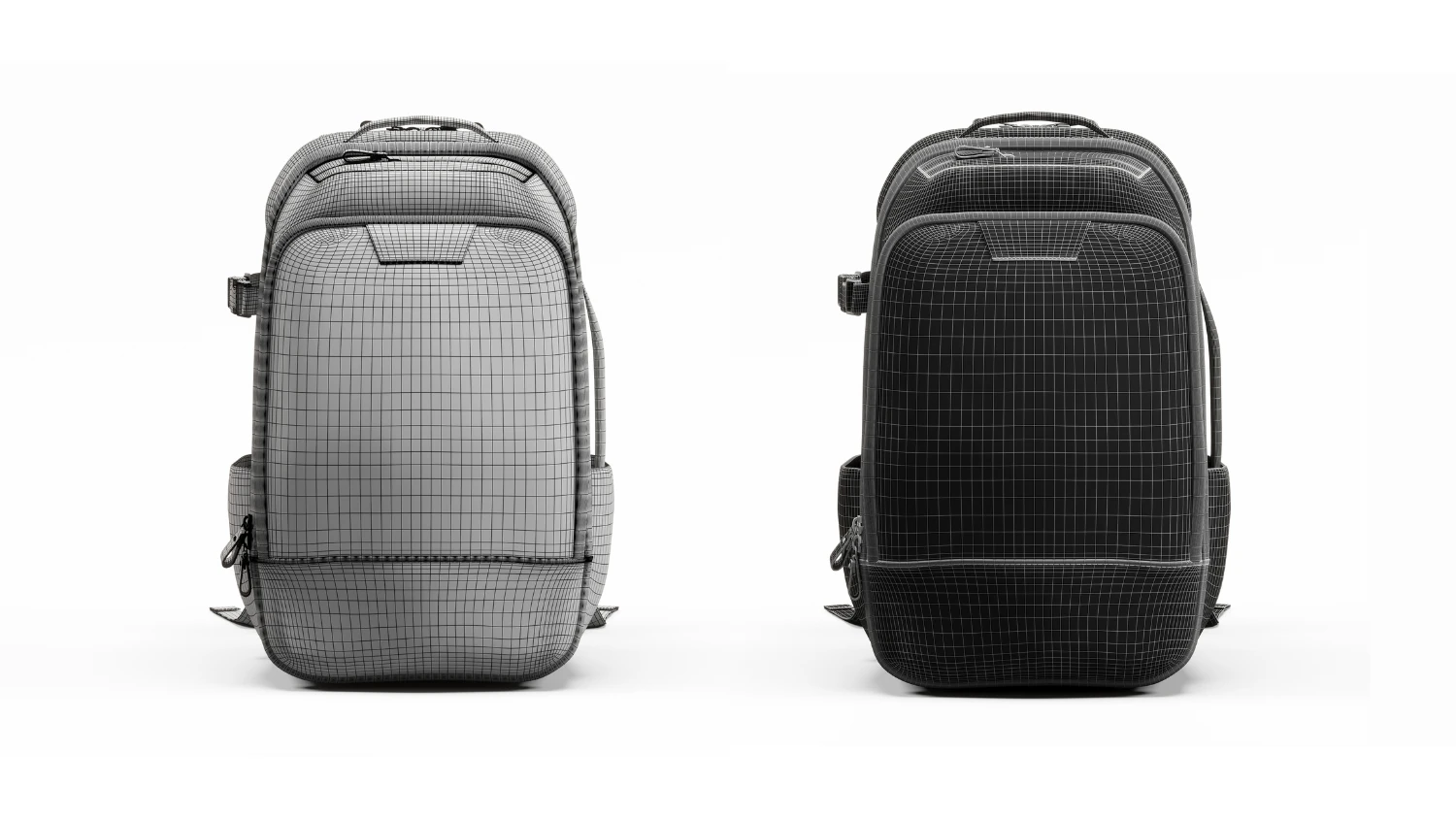
Rendering starts with digital geometry. Modelers build shapes from CAD files, sketches, photographs, references, or existing 3D models, following 2D drawings, building plans, or blueprints. The result is a model that defines the exact shapes, sizes, and positions of every object.
Stage 2. Materials and Texturing
Materials, colors, surface properties, and textures define how objects look. Materials control properties such as color and reflectivity, while textures add surface detail. Here, 3D rendering means simulating how real surfaces respond to light, so accurate materials separate a convincing image from a flat one.
Stage 3. Lighting and Camera Setup
Lighting and camera decisions shape the final visual output. Natural and artificial lights determine brightness, shadows, and reflections, while camera angles and perspective decide what the viewer sees and how large it appears. Together they turn a prepared 3D scene into a specific view.
Stage 4. Rendering and Image Processing
What is rendering in 3D at this stage? Software calculates how light interacts with geometry and materials to produce the final image, using algorithms such as ray tracing or path tracing. Image size, or render resolution, is also set at this stage. Post-processing is an optional last stage: color correction, compositing of separate render passes, and final adjustments.
What Are the Main Types of 3D Rendering?
Let’s review what are 3D renderings in practice. They fall into several types, depending on style, format, speed, and subject.
Photorealistic vs. Stylized 3D Rendering
Photorealistic renders imitate photographs and suit marketing, brochures, and sales. Stylized, or non-photorealistic, renders use sketch-like or cartoon looks that focus attention on form, which suits early planning.
Still Images vs. 3D animation
A still image shows one fixed view. Animation moves the camera through a space or around a product. So viewers can follow the layout and flow, but it takes more time than a single image.
Interactive (Real-Time) vs. Offline Rendering
Real-time engines draw the scene instantly. With it, users can navigate, edit, and review live. Offline rendering calculates physically accurate light over minutes or hours, which suits high-quality final stills.
Product vs. Architectural and Environment Rendering
What is 3D rendering used for in each field? Product rendering serves eCommerce and catalogs, keeping many SKUs and variants consistent, while architectural and environment rendering presents buildings, interiors, and sites before construction.
360-Degree vs. Static Rendering
A static render shows one camera angle. A 360-degree view lets viewers rotate a product or look around a space and requires a consistent rotation sequence or an interactive viewer.
What Are the Different 3D Rendering Techniques?
Techniques are algorithms that turn a 3D scene into an image. So the 3D rendering meaning in practice depends on which one is used. They are not interchangeable. Each type calculates light differently, which affects realism and production speed.
Ray Tracing
Ray tracing simulates how light rays travel, bounce, and reflect off surfaces. It also includes crisp shadows, detailed reflections, and refractions. It adds realism where light behavior is visible. Still, each traced ray adds computing work.
Path Tracing
Path tracing is a form of ray tracing. It traces full light paths with many bounces, averaging random samples per pixel. This produces realistic global illumination, soft shadows, and color bleeding. But it’s slow and noisy until converged.
Rasterization
Rasterization projects 3D geometry, usually triangles, onto the screen and converts it into pixels. Each is shaded directly. This type of rendering is extremely fast, which is why real-time engines and interactive applications rely on it.
Scanline Rendering and Other Techniques
Scanline rendering processes an image one line at a time with simple calculations. This traditional approach favors speed over realism. Methods are often combined. Hybrid renderers pair real-time rendering with ray tracing or global illumination for detailed areas.
What Is 3D Rendering Used For?
In business, a 3D rendering communicates product features, presents concepts, and supports marketing and sales, as the industries below show.
Product Rendering for eCommerce and Manufacturing
Brands build catalog, white-background, lifestyle, and close-up images with 3D product renders. They also show variations and customization through a 3D configurator. This allows them to market products before they are manufactured, without a photoshoot for every variation. For a Dutch storage brand, PIXREADY produced lifestyle renders of four products in five scenes. With it, the brand avoided an estimated $13,000-20,000 in photography costs.
“PIXREADY delivered exceptional value for money, providing us with fast, high-quality output. The project timelines were consistently met, usually within a week. Communication and collaboration were perfect, ensuring a seamless and productive process. PIXREADY’s service helped us achieve better and faster theme/ambient renders compared to expensive photo shoots, significantly impacting our visual representation.”
Architectural and Interior Rendering
Interior architectural rendering and exterior visualization shows finishes, materials, and furniture before construction. Architectural visualization helps clients and approvers review design and support pre-construction marketing. Material and furniture options can be compared side by side. Interior teams can also weigh AI interior rendering against traditional methods.
Real Estate and Property Marketing
Developers present residential and commercial properties, exteriors, and interiors. For real estate, 3D renders also support off-plan marketing and explain development concepts. NAR’s 2025 survey found 38% of buyers rated virtual tours very useful.
Advertising and Marketing
3D visuals produce campaign images, promotional materials, launch visuals, and digital ads. One model can be reused across channels without new shoots.
Automotive and Industrial Visualization
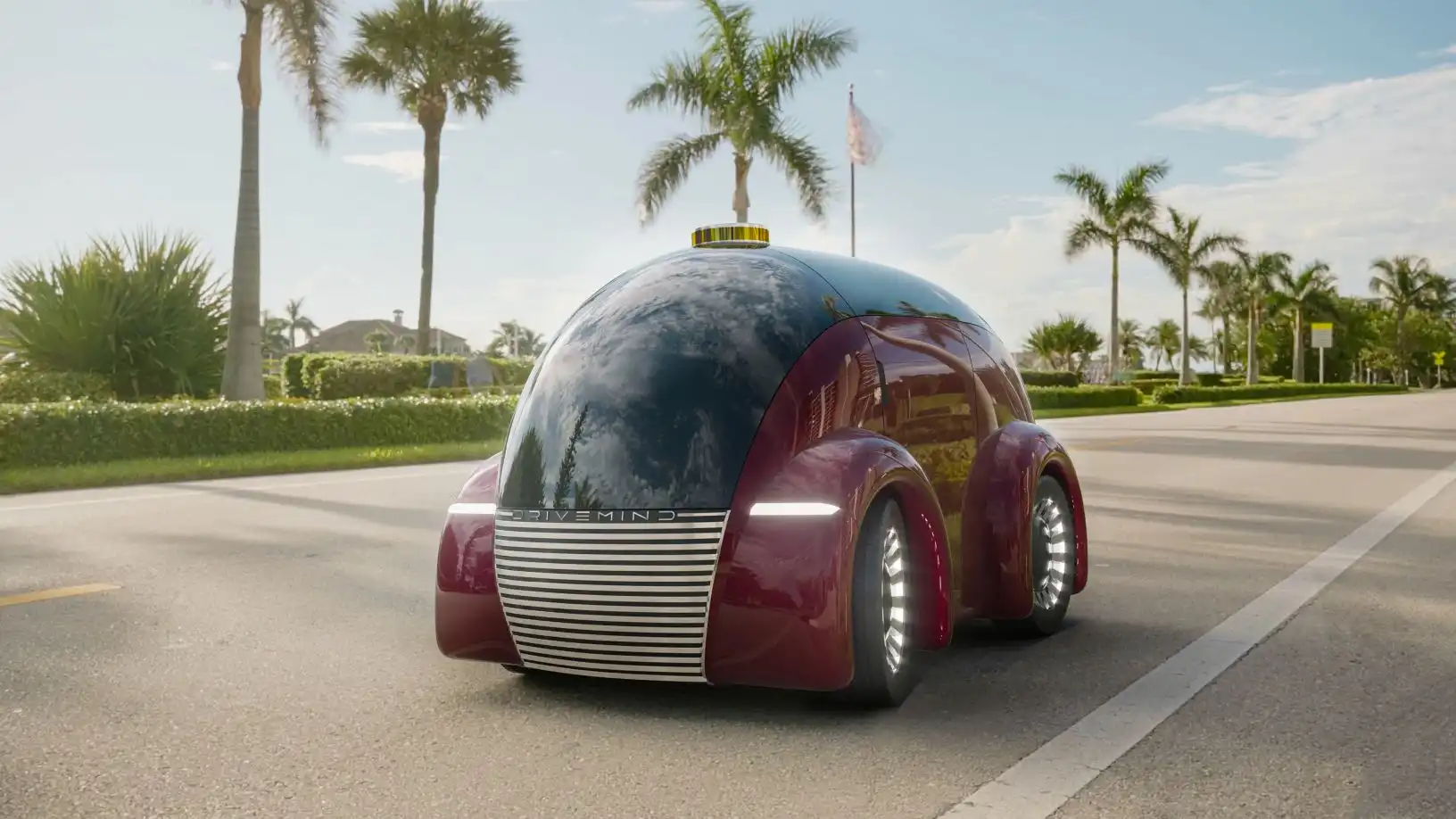
Rendering showcases vehicle designs, components, industrial equipment, and complex products before they are built. For DriveMind, a New Jersey autonomous-delivery startup, PIXREADY delivered photorealistic renders of an unbuilt vehicle. They resulted in 40% more investor engagement, 30% faster concept approvals, 25% higher presentation conversion, and 20% lower MVP production costs.
What Is the Difference Between 3D Rendering, 3D Modeling, and 3D Visualization?
What is 3D visualization, and how does it differ from modeling and rendering? These three commonly confused terms name different parts of 3D production. For example, 3D visualisation meaning differs from the other two concepts.
- 3D modeling creates the digital geometry of an object or environment- the shapes, dimensions, and structure everything else builds on.
- 3D rendering generates visual output, such as stills, animation frames, or interactive views, from a prepared 3D scene.
- 3D visualization is the broader discipline of communicating ideas, products, and spaces through 3D visual content, including interactive viewers and AR.
In a professional workflow, these processes work together. Modeling builds the scene, rendering produces the images, and visualization plans and uses them. The full chain is explained in how does CGI work.
What Tools and Technologies Are Used in 3D Visualization?
What is 3D visualisation software made of? Several categories work in sequence; tool choice depends on project type, required quality, and final output.
3D Modeling and CAD Software
Modeling tools such as Cinema 4D, SketchUp, and Autodesk Maya build polygonal geometry for visuals. CAD tools such as SolidWorks create technically accurate product geometry for engineering. CAD data is built for manufacturing, so it usually needs cleanup before rendering. Under the 3D visualisation definition, this geometry feeds every later stage.
Rendering Engines and Visualization Software
Rendering engines calculate lighting, shadows, materials, and reflections to generate final images. V-Ray, Corona, Arnold, Cycles, Redshift, and OctaneRender are common examples. For architectural projects, compare the best architecture rendering software. Some are built into modeling software, while GPU-accelerated engines such as Octane and Redshift run as plugins inside host applications.
Real-Time Visualization and Interactive Technologies
So what is 3D visualization once it becomes interactive? Real-time engines let users explore 3D environments, interact with objects, and change product configurations instantly. Unreal Engine, Unity, and web technologies such as Three.js power interactive configurators, virtual tours, and real-time architectural presentations.
AI Tools in 3D Visualization Workflows
AI supports concept development and ideation, automated modeling and asset generation, denoising, upscaling, and post-production. It can accelerate selected stages, but professional CGI remains essential when projects need precise geometry, controlled materials, consistent product variations, and production-ready assets.
Why Choose PIXREADY for Professional 3D Rendering Services?
PIXREADY is a professional 3D visualization partner for businesses that need high-quality visual content for products, architecture, and real estate. It turns product data, CAD files, sketches, and design concepts into photorealistic visual assets. By the 3D visualization definition, that covers the full chain, not rendering alone.
- Services: product and eCommerce rendering, architectural and interior visualization, real estate animation, and interactive visual solutions such as configurators and virtual tours.
- Scale: scalable CGI production for marketing, sales, and digital experiences, backed by 50+ 3D professionals, 1,500+ projects for 250+ clients, and a dedicated project manager.
PIXREADY’s hybrid workflow pairs AI-assisted ideation with production-grade 3D modeling, so creativity speeds up without losing control over geometry, materials, and scale. Visuals are built for commercial use: catalogs, listings, presales, investor decks, and campaigns draw on the same approved 3D assets, so content stays consistent across channels and updates without new shoots. PIXREADY serves US clients from New York, Texas, California, Illinois, and Florida, working across time zones with clear estimates and no hidden fees.
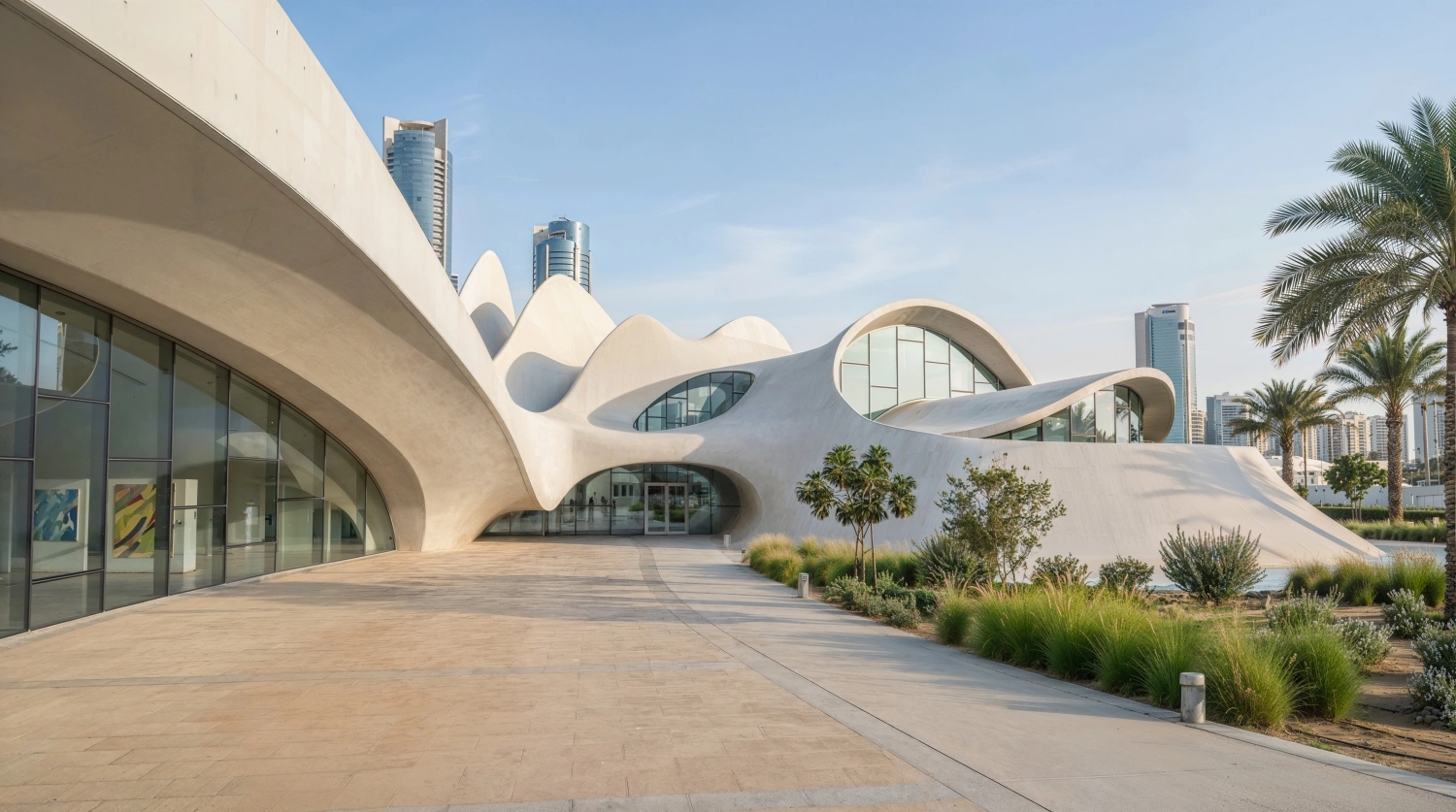
Case study: Bionic Architecture, a public landmark concept. PIXREADY tested a hybrid workflow for an architectural concept in the UAE. AI tools generated organic forms and hand sketches refined them; the architecture was then built in Autodesk 3ds Max for precise geometry and scale. The finished model served as a stable foundation for every output. AI later produced over 120 context and lighting variations, composited in Photoshop, plus a fly-through animation edited in After Effects. The project earned Platinum at the International Architecture & Design Awards 2026 in AI-Powered Architectural Visualization & Rendering.
Conclusion
What is a 3D rendering? It is the process of turning a 3D scene into images or animations through modeling, materials, lighting, camera setup, and rendering. Techniques, types, and tools differ, and rendering works best alongside modeling and visualization. Businesses use it to present products and properties before they exist, cut photoshoot costs, and keep visuals consistent. Choose an approach based on output and accuracy, and consider a professional partner such as PIXREADY for scalable production.
To compare providers first, see the top 3D rendering companies in the USA.
Get 3d expert on your side
More than a 3D rendering vendor, PIXREADY acts as a strategic CGI partner helping brands
сreate scalable visual content for marketing, sales, and product launches. Let's explore your
project and discuss how CGI can support your business goals!

Stas Dunaevskiy is an Account Manager and Business Development Specialist at PIXREADY, a company focused on scalable CGI production and architectural visualization. He helps clients explore the possibilities of cutting-edge CGI technologies, with a special focus on immersive 3D walkthroughs, virtual tours, and architectural visualization. He has worked with real estate developers, construction companies, and product manufacturers, guiding them toward solutions that bring their projects to life and support business goals. With his consultative approach, Stas ensures that each PIXREADY project combines creative vision with the latest advancements in 3D visualization.