3D Modeling vs Rendering: Definition, Differences, and Applications
Explore the difference between 3D rendering vs modeling, how they work together, and which service businesses need for product, architectural, and marketing projects.

Many businesses use the terms modeling and rendering as if they mean the same thing. They do not. 3D modeling vs rendering describes two connected stages: 3D product modeling builds the digital object or scene, while 3D product rendering turns it into a finished image or animation. Understanding that difference helps teams choose the right service, budget, and workflow.
What Is 3D Modeling?
3D modeling is the process of building a digital object, product, building, or environment in three dimensions. Instead of creating a flat image, artists define the object's shape, proportions, dimensions, components, and surface structure.
Different projects use different modeling methods. Polygonal modeling is common for products, furniture, interiors, and digital environments. CAD-based workflows are useful when exact dimensions and engineering data matter. Digital sculpting is better suited to organic or highly detailed forms. Mesh modeling creates surfaces from connected vertices, edges, and polygons.
What Does a 3D Model Include?
A production-ready model may contain:
- Shape and dimensions
- Geometry and topology
- Separate components and construction details
- Surface features
- Materials and textures, depending on the workflow
The required level of detail depends on how the asset will be used. In professional 3D rendering vs 3D modeling, a distant architectural view may need less detail than a product model intended for close-up marketing images or a configurator.
What Is 3D Modeling Used For?
Businesses use 3D models for product development, manufacturing, architecture, interiors, digital twins, AR/VR, marketing, animation, and configurators. A reusable model can also become the base asset for future campaigns instead of being rebuilt for every new image.
For product-driven companies, 3D modeling in product design is especially valuable when teams need to review proportions, create variations, or prepare visuals before manufacturing begins.
Examples of 3D Modeling
Examples include product and furniture models, industrial equipment, vehicles, buildings, and complete interior scenes. This is the core idea behind 3D modeling vs 3D rendering: modeling creates the asset that later stages can reuse.
.webp)
What Is 3D Rendering?
3D rendering is the process of generating a 2D image or animation from a prepared 3D scene. The model provides the geometry, while rendering turns that geometry into the final visual.
Rendering software calculates lighting, shadows, reflections, materials, textures, camera perspective, and environmental effects. Artists refine these elements to achieve a specific result, from a clean catalog packshot to a photorealistic lifestyle scene.
What Does 3D Rendering Include?
A typical rendering setup includes:
- Camera position and composition
- Lighting
- Materials and textures
- Background or environment
- Shadows and reflections
- Post-production
- Final image or animation output
The same model can produce many different renders. A furniture brand, for example, may use one chair model for a white-background product image, a styled room scene, a close-up material shot, and a 360-degree presentation. This also shows the difference between modeling vs rendering: the model remains reusable, while each render presents it in a specific visual setting.
What Is 3D Rendering Used For?
Rendering is commonly used for product advertising, eCommerce imagery, architectural presentations, real estate marketing, social media, catalogs, brochures, packaging visuals, launches, and investor presentations.
A photorealistic render can also communicate a product before it physically exists. This makes rendering vs modeling important for marketing teams working ahead of manufacturing schedules. For a deeper look at commercial applications, product rendering explains how CGI supports product presentation across sales channels.
Examples of 3D Rendering
Typical outputs include product packshots, interior and exterior scenes, lifestyle images, animations, and 360-degree product views.
.webp)
3D Modeling vs 3D Rendering: Key Differences
The simplest way to understand 3D rendering vs 3D modeling is to compare what each stage creates. Modeling builds the digital asset; rendering uses that asset to create finished visual content.
The two stages solve different problems, so 3D rendering vs modeling is not a choice between competing alternatives. Most commercial CGI projects need both.
3D Model vs 3D Render: What Is the Actual Difference?
A 3D model is the digital object itself. It has geometry, dimensions, components, and surfaces. It can be rotated, edited, placed into new scenes, animated, or reused for future content.
A 3D render is an image or animation created from that model. It captures a specific camera angle, lighting setup, material appearance, and environment.
A simple chair example makes render vs model easier to understand. The model is the digital chair that an artist can rotate or modify. The render is the polished image of that chair in a catalog, room scene, advertisement, or product page.
This difference matters commercially. A model is an asset that can keep producing content. A render is one finished piece of that content.
For companies planning configurators, AR/VR, animation, or large product catalogs, 3D rendering vs modeling should therefore be considered as part of a longer-term asset strategy rather than as two isolated purchases.

3D rendering vs 3D modeling: How They Work Together
A typical production workflow moves from technical information to an editable model and then to finished visual content:
References / CAD files → 3D Modeling → Materials & Textures → Lighting & Camera → 3D Rendering → Post-Production → Final Visual
Step 1. Collect References
The team gathers CAD drawings, product photos, sketches, technical specifications, dimensions, and material references.
Step 2. Build the 3D Model
Artists create accurate geometry, add components, and match the required proportions. This stage determines whether later renders will represent the product correctly.
Step 3. Apply Materials and Textures
Surfaces are created to reproduce wood, metal, plastic, fabric, glass, paint, or other finishes. PBR materials may be used when realistic light behavior is required.
Step 4. Set Up the Scene
In 3D modeling vs rendering, this stage shifts the focus from geometry to visual presentation. Artists choose the camera, lighting, environment, background, and supporting props according to the intended use.
Step 5. Render the Scene
The software generates high-resolution images or animation frames.
Step 6. Post-Production
Color correction, compositing, retouching, and final optimization prepare the visuals for delivery.
This workflow explains why 3D modeling vs rendering is best understood as a sequence: accurate geometry supports accurate visual presentation.
3D Modeling and Rendering for Different Industries
The balance between 3D rendering vs 3D modeling changes depending on the industry and business goal.

eCommerce and Product Brands
Online sellers need consistent packshots, lifestyle scenes, variants, and 360-degree views. Reusable models make it easier to create many product images without repeated photography. 3D visualization for eCommerce is especially useful for catalogs with multiple colors, finishes, or configurations.
Architecture and Real Estate
Architectural models define buildings, interiors, landscape elements, and spatial relationships. Rendering then turns these scenes into interior, exterior, aerial, or marketing visuals that help communicate projects before construction.
Rendering vs modeling becomes especially important here because one accurate architectural model can support many viewpoints, design updates, and presentation formats throughout the project.
Healthcare and medical technology projects can use the same workflow when products or complex environments must be shown clearly. 3D medical visualization can present equipment, internal mechanisms, or training scenarios that are difficult to photograph.
Furniture
Furniture brands need accurate proportions and materials at the modeling stage, followed by room scenes, packshots, catalog images, or configurator assets. 3D furniture rendering allows one product model to support many interiors and marketing formats.
Manufacturing
Manufacturers often begin with CAD data. Models can then support technical visualization, exploded views, product renders, and future content without rebuilding the product from scratch. In manufacturing, 3D modeling vs rendering separates the creation of technically accurate geometry from the production of visuals designed for sales, training, or technical communication.
Marketing and Advertising
Agencies use custom models to create campaign visuals, CGI advertising, product animation, and content that would be difficult or expensive to photograph. 3D rendering for agencies also makes it easier to keep materials and products consistent across multiple campaign assets.

How to Choose the Right 3D Service
Choosing between 3D rendering vs modeling depends on what already exists and what you need to produce next.
Choose 3D Modeling If:
- You need a reusable 3D asset.
- No suitable model currently exists.
- The object must be used in a configurator, animation, AR/VR experience, or digital environment.
- Accurate dimensions and editable geometry are important.
Choose 3D Rendering If:
- A production-ready model already exists.
- You need final marketing images or animation.
- Photorealistic presentation is the priority.
- You need different scenes, cameras, or lighting setups from the same model.
Choose Both If:
- No suitable model exists, and finished visuals are required.
- The asset will support several marketing channels.
- Multiple views, environments, product variants, or animations are planned.
For configurable products, an eCommerce 3D configurator usually depends on accurate modeling first. If budget is the main decision factor, PIXREADY's 3D service pricing provides a useful starting point for planning production.
In practice, 3D product modeling vs product rendering is usually a question of asset creation versus final content production.
How PIXREADY Combines 3D Modeling and Rendering
PIXREADY manages modeling and rendering within one production workflow, helping brands avoid geometry changes, inconsistent materials, and repeated asset preparation between separate suppliers.
The workflow can include:
- 3D product modeling from CAD files, drawings, sketches, and references
- Photorealistic product rendering
- Architectural modeling and visualization
- Furniture and product visualization
- 360-degree rendering
- Product animation
- Configurator-ready assets
- Reusable models for future campaigns
- Consistent materials, lighting, and visual standards across collections
Keeping both stages together also improves scalability. Once the geometry and materials are approved, teams can create additional angles, environments, animations, or product variations without rebuilding the core asset. This reduces production friction when a brand needs dozens or hundreds of visuals across eCommerce, advertising, catalogs, and sales presentations.
The difference between 3D product rendering vs product modeling is still important, but combining them through one workflow allows the outputs of one stage to support the next.
Case Study: Medical Equipment
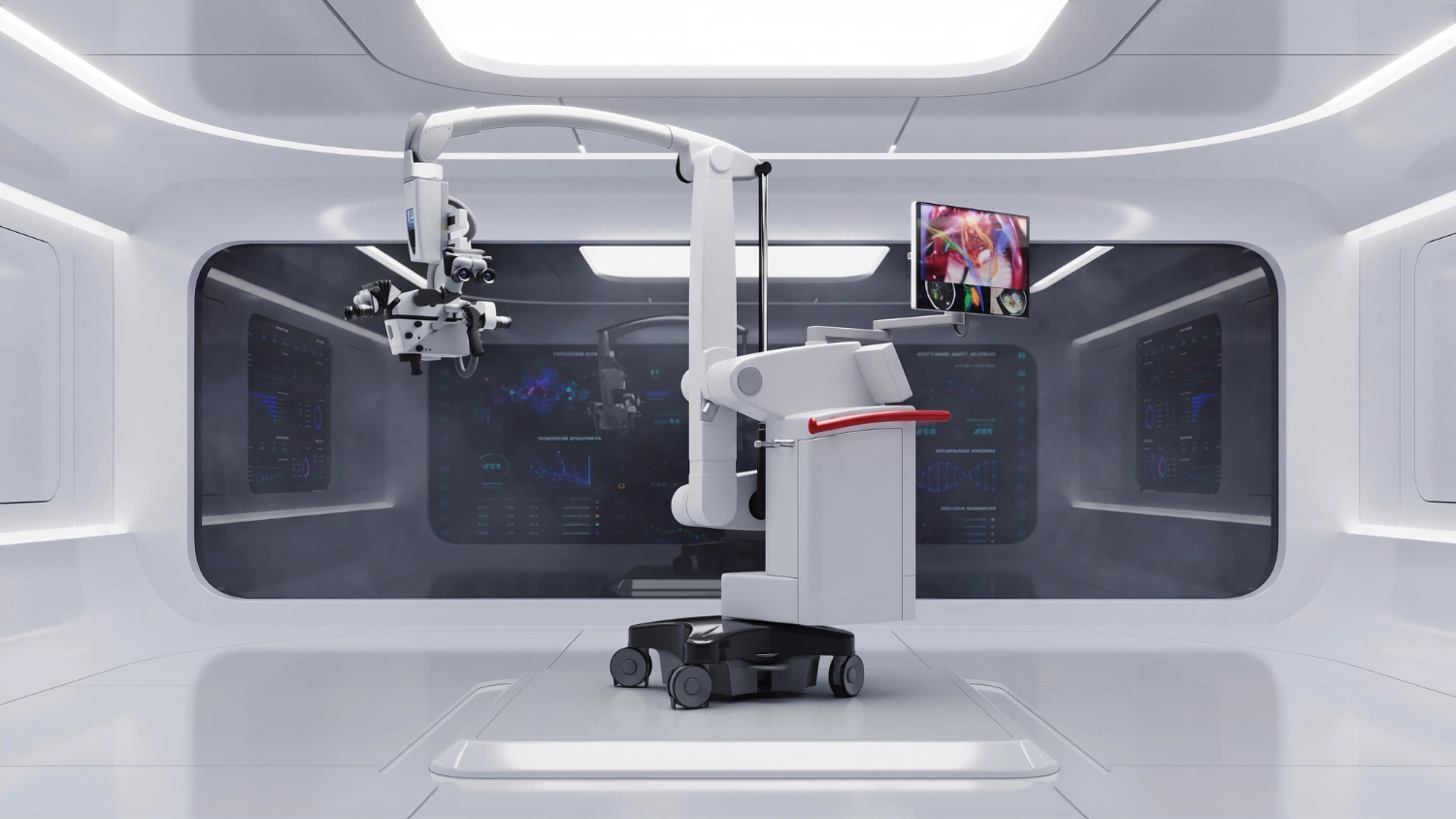
A real medical equipment visualization project shows how this works. PIXREADY created a precise 3D model and photorealistic renders of a mobile surgical operating microscope for a US-based project. The visuals highlighted the articulated balancing arm, microscope head, integrated display, controls, and optical components while maintaining a clean clinical presentation.
Special attention was given to materials, finishes, proportions, reflective surfaces, and complex mechanical details to represent the equipment accurately. The visuals were designed for hospital presentations, exhibitions, investor pitches, product launches, websites, and marketing materials, helping communicate sophisticated medical technology clearly before physical products are available.
Conclusion
3D modeling vs rendering is not about choosing one process over the other. Modeling creates the reusable digital asset, while rendering turns that asset into finished visual content for marketing, sales, product development, or presentations.
Businesses planning long-term visual production gain the most value when both stages work together. Investing in accurate models and professional renders creates a stronger foundation for consistent, scalable content across future campaigns and channels.
Get 3d expert on your side
More than a 3D rendering vendor, PIXREADY acts as a strategic CGI partner helping brands
сreate scalable visual content for marketing, sales, and product launches. Let's explore your
project and discuss how CGI can support your business goals!

Lily Sten is Stream Lead for 3D Modeling & Configurator Solutions at PIXREADY, a 3D visualization and CGI production company. She specializes in guiding clients through complex 3D modeling projects, helping them transform product ideas into detailed and accurate visualizations. She has a strong understanding of 3D configurators and how they empower brands to offer interactive, customizable experiences for their customers. By combining technical insight with a client-focused approach, Lily ensures each PIXREADY configurator and visualization project is both visually impressive and strategically valuable.
FAQ
What is the difference between 3D modeling vs rendering?
3D modeling creates the editable digital object or scene, while rendering converts that 3D asset into a finished image, animation, or visual presentation.
How does rendering vs modeling differ in a typical 3D workflow?
Modeling comes first to create accurate geometry. Rendering follows by adding cameras, lighting, materials, environments, and visual effects to produce the final content.
What is the difference between a render vs a model?
A model is an editable 3D asset that can be reused. A render is a finished visual created from that model using one specific presentation setup.
What files are needed for 3D modeling and rendering?
Useful inputs include CAD files, technical drawings, product photographs, dimensions, sketches, material references, brand guidelines, and existing 3D models when available.
Can the same 3D model be used for multiple renders?
Yes. One model can generate many camera angles, environments, finishes, product variants, animations, and marketing visuals without rebuilding the underlying geometry.
When should a business choose 3D product rendering vs product modeling?
Choose modeling when a reusable digital asset is needed. Choose rendering when a suitable model exists, and the goal is polished marketing or presentation content.

-2.webp)